
MbogiBet Kenya app – mobile betting on your terms
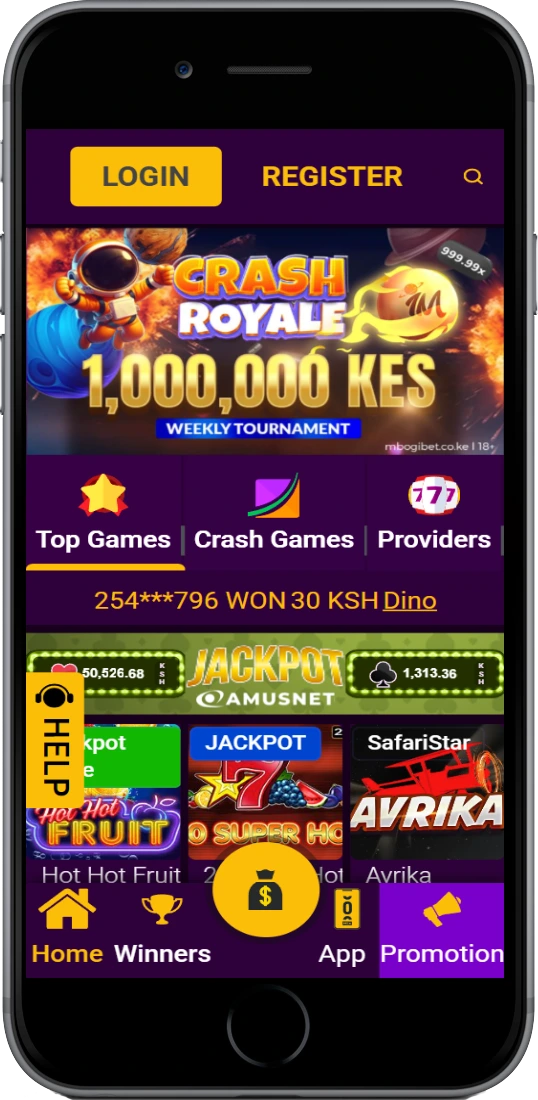
Place bets on football, crash games, and live casino directly from your phone. The Android app runs on any device with Android 5.0 or above — no Play Store needed, direct APK download from this page.
 Download for Android
 Open in Browser (iOS)
What the MbogiBet app gives you
The app is not a stripped-down version of the site. You get the full sportsbook — pre-match and live betting on KPL, EPL, Champions League, NBA, rugby, and athletics. Crash games like Aviator (RTP 97%) and JetX load in under 3 seconds on a standard Safaricom 4G connection. The live casino section runs Evolution Gaming tables including Lightning Roulette and Infinite Blackjack with no noticeable lag on 3G, which matters if you're betting from Eldoret or Kisumu where 4G coverage can be patchy.
M-Pesa deposits go through Safaricom Paybill directly from the app — you don't get redirected to a browser. Withdrawals to M-Pesa process in 4–6 hours. The app stores your login credentials securely and supports biometric login on compatible devices. Notifications for live match updates and promotion alerts can be toggled on or off in settings.
Fast loading
Crash games under 3 sec on 4G
Android 5.0+
Works on any mid-range Kenyan handset
Full casino
Slots, crash games, live dealer tables
Full sportsbook
KPL, EPL, live betting, cashout
M-Pesa built in
Deposit and withdraw without leaving the app
Biometric login
Fingerprint access on compatible devices
Aviator on mobile
Full Spribe Aviator experience, RTP 97%
Live notifications
Match alerts and promo updates
How to download and install MbogiBet on Android
The APK file installs in under a minute on most Android phones. Here's the exact process:
-
1
Allow unknown sources
Go to Settings → Security (or Apps, depending on your Android version) and enable "Install from unknown sources" or "Allow this source." On Samsung devices running Android 8+, this prompt appears automatically when you open the APK.
-
2
Download the APK
Tap the Download for Android button on this page. The file is around 15–20 MB. On a standard Safaricom connection it downloads in under 30 seconds.
-
3
Open the file
Pull down your notification shade and tap the downloaded file, or open it from your Files app. Tap Install when prompted. The installation takes around 10–15 seconds.
-
4
Log in or register
Open the app, enter your phone number and password. New players tap Register and complete sign-up directly inside the app — same process as the website, under 3 minutes.
iOS users: a dedicated app is not available on the App Store. The mobile browser version at mbogibet-kenya.com is fully optimised for Safari on iPhone and loads all the same features including M-Pesa deposits and live betting.
App vs mobile browser – what's the difference?
Both work. The app loads faster on repeat visits because assets are cached locally. The mobile browser requires no installation and works on iPhone and Android equally. Push notifications are only available in the app. Biometric login is app-only. Everything else — betting markets, casino games, payments, bonuses — is identical.
| Feature | Android app | Mobile browser |
|---|---|---|
| Installation required | Yes (APK) | No |
| iOS support | No | Yes |
| Load speed (repeat visits) | Faster (cached) | Standard |
| Push notifications | Yes | No |
| Biometric login | Yes | No |
| M-Pesa deposits | Yes | Yes |
| Full sportsbook | Yes | Yes |
| Live casino | Yes | Yes |
| Crash games (Aviator) | Yes | Yes |
| Bonuses & promotions | Yes | Yes |
System requirements and compatibility
The MbogiBet app runs on Android 5.0 (Lollipop) and above. That covers the vast majority of Android handsets currently in use across Kenya, including entry-level Tecno, Itel, and Infinix phones popular in Nairobi, Mombasa, and Kisumu. The APK file size is approximately 18 MB — well within free space on any phone with at least 1 GB of storage. RAM requirement is 1 GB minimum; 2 GB and above gives noticeably smoother performance when running Aviator or live dealer games.
Android version
5.0 (Lollipop) or above
APK file size
~18 MB
RAM (minimum)
1 GB
Free storage needed
~50 MB
Internet connection
3G minimum; 4G for live casino
iOS availability
Mobile browser only